Flag a watchlist face. Forget every other one.
Facial recognition for UK retail, done the responsible way. Your team shouldn't have to recognise a repeat offender before you do. QuantumEye quietly flags someone already on your watchlist the moment they enter, at any store across your estate, and sends a manager a heads-up on their phone to review. Staff and suppliers are whitelisted so they pass without friction. Everyone else is counted, never identified. And nothing happens to anyone until a person reviews and approves.
Illustrative demo data · a person decides · every step logged
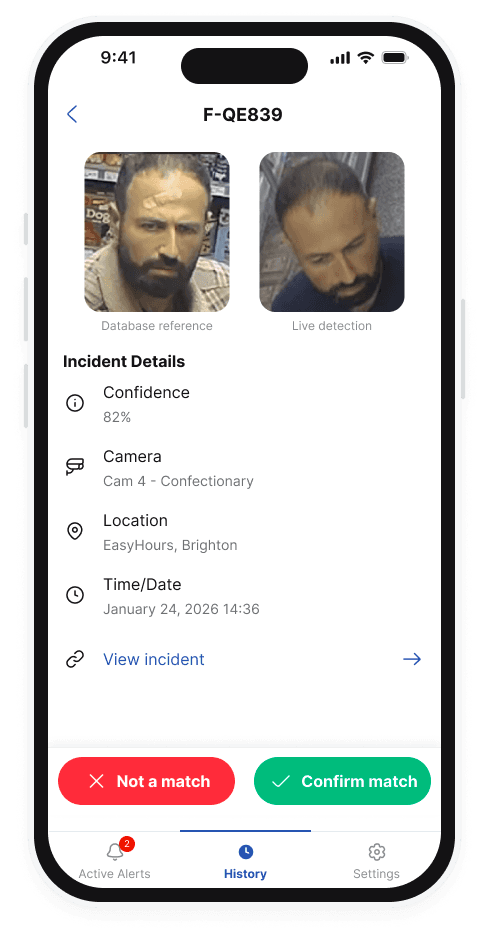
Repeat offenders account for a disproportionate share of UK retail theft (BRC trend reporting). QuantumEye delivers real-time AI loss prevention on existing CCTV, ICO-registered and ISO 27001 certified, with human review on every consequential action.
It does three jobs, and a person makes every call that matters.
QuantumEye doesn't decide who someone 'is', it surfaces a possible match and asks for human confirmation. That separation is the GDPR-safe path.
Watchlist matching
A face captured at one store is flagged at every other store in your estate. Repeat offenders stop being your other manager's problem.
Whitelist matching
Staff, contractors, VIPs and trusted suppliers pass without triggering alerts. Enrolled in seconds in the dashboard.
Anonymous when not matched
Faces that don't match either list are counted, not identified. No profiles built, no PII stored.
How this is different from live facial recognition.
You have seen the headlines about facial recognition in shops, and you do not want your brand in one. This is the version you can explain to a customer, a journalist or a regulator without flinching. A shopper who is not on your own list leaves no name, no profile and no record behind. Recognition here only ever surfaces a known repeat offender to a person, who decides. That is the line between recognition and surveillance.
Face data lives separately from video. Always.
A face is turned into a string of numbers, never a stored photo, and those numbers are kept in a completely separate place from the video. The two are never stored together.
Turned to numbers on the camera
The face is detected on the camera and turned into a string of numbers, then sent to the cloud. The actual face image is never kept.
Checked against two lists
Your watchlist and your staff and visitor whitelist are kept completely separate. A match is scored, never auto-confirmed.
Human-in-the-loop
A QE Administrator approves the match before any consequential action. No automated decision. No automated police report.
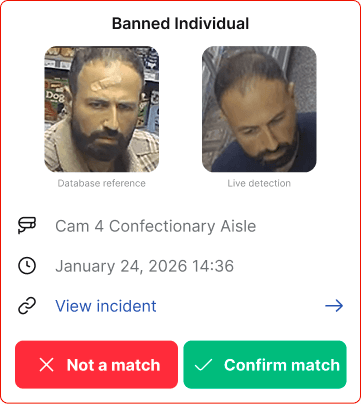
Morning open. A face from other stores in the estate walks in.
Illustrative scenario. The watchlist returns a candidate match; the manager reviews the profile and prior events. Security does a friendly approach. He leaves without incident.
Face Recognition Review
Human review before any action
Nothing happens until a human approves — this match is queued, not actioned.
- Individual
- #QE101
- Status
- On watchlist
- Source
- Automatic
- Prior matches
- 2 stores
- Added
- 02 May 2026
- Candidate matchWatchlist hit · CAM-02 · entrance14:32:08
- Queued for reviewapproved = false · awaiting human14:32:09
Runs better together.
Shoplifting Detection
Behaviour-based concealment, grab-and-run and till incidents, flagged on the alert track, not in a CCTV review.
PulseWhitelist Groups
Staff, VIPs, suppliers, contractors, granular access, enrolled in seconds in the dashboard.
GuardAfter-Hours Guard
Zero-touch arming. Night-vision detection. Evidence pack, all before the call.
Recognised, never identified, without a human saying yes.
This is the part your DPO will ask about, so here it is plainly. A match is only ever a suggestion until a named person accepts it. Nothing about an individual is confirmed, stored as a profile, or acted on without that human step, and every step is logged, so you have a clear answer if the ICO ever asks how a decision was made.
Match ≠ identification
A high-confidence match surfaces a candidate. A human reviewer accepts or rejects before the system attaches a name.
Face data stored separately from video
The numbers that represent a face are kept apart from the video, never together in the same record or clip.
30-day default retention
Face data for people not on your watchlist is purged after 30 days. Watchlist profiles are kept until they come off the list, plus a grace period.
Right to erasure
Individuals are soft-deleted on request. No hard deletes ever, soft-delete maintains the audit trail.
Related guides
See it run on your real watchlist.
We can demo against a sample list, anonymised, from your own incident history. The signal is harder to argue with than a marketing example.